





Facebook Twitter Instagram
    Trending
    • JJRC C8827 PRO-YW 1/43 Scale 4WD RC Car Review-The Ultimate Miniature Drift Machine
    • JNR Sellarc 100K Review: The Ultra-Endurance Refillable Experience
    • Hellvape Vsee Now Pod System Kit Review: Compact, Convenient, and Flavorful Vaping
    • DC40V Open Source Retro WIFI Handheld Game Console at $51.99– Classic Gaming Meets Modern Power
    • WPL C94 4WD RC Car Review-A Classic Off-Road Legend Reborn in RC Form
    • DT NO.1 DTG1 Smart Watch Review: The Ultimate Companion for Health, Fitness, and Daily Convenience
    • DWi H10 RC Helicopter Review at $22.99: Elevating the Beginner Experience with Smart Tech
    • Potensic ATOM 2 RC Drone Review: A 10KM FPV Powerhouse That Fits in Your Palm
    Facebook YouTube
    Login Register
    IGeeKphone China Phone, Tablet PC, VR, RC Drone News, Reviews
    • HOME
      • NEWS
        • DeepSeek
        • ChatGPT
        • Minecraft
    • Amazon
    • CHRISTMAS
    • PHONE
      • Top Phones For Your First Choice
      • Phone Comparison
      • Xiaomi
      • Blackview
      • Unihertz
      • Doogee
      • Black Shark
      • Geekbuying
      • Banggood
      • TEMU
      • TikTok
      • Aliexpress
      • Walmart
      • Newegg
      • MercadoLibre
      • Lazada
    • TOP VAPE Awards for 2025
    • VAPES
      • E-CIGAR Upcoming
      • Vape News
      • Vape Market Trend
      • Vape Deals
      • Expo News
      • Vape Comparison
      • Vape Guide
        • Guide For Beginners
        • Guide for Best Users
      • Giveaway
    • BEST VAPE
      • Best Vape Stores
      • Best Starter Vape Kits
      • Best Vapes for Beginners
      • Best Disposable Vapes
      • Best Pod Systems
      • Best Pod Mod Vapes
      • Best Mods
      • Best Nicotine Pouches
      • Best Clearomizers/Tanks
      • Best E-Liquid
      • Best EGO/Pens
      • Best Vapes for Nic Salt E-Juice
      • Best Vapes to Quit Smoking
      • RDA vs. RDTA vs. RTA
    • Best Vape Brand 2025
      • VAPORESSO
      • VOOPOO
      • OXVA
      • NEXA BAR
      • ORIONBARTECH
      • MASKKING VAPE
      • VEIIK
      • MEMERS
      • SP2S
      • JNR
      • TODOO
      • MRFOG
    • REVIEW
      • E-cigar Review
      • Phones
      • Tablet PC
      • TV Box
      • RC Drone
      • Wearables
      • Camera
      • Accessories
      • VR Headset
    • MORE
      • 3D PRINTER
        • 3D Printer Review
        • Anycubic
        • FLSUN
        • Xtool
        • LONGER
        • Top 3D printer to Choose First
      • TREND
      • CLOTHES
      • AUTO CAR
      • POWER STATION
        • Oukitel
        • FOSSIBOT
      • GAMING
        • Top Gaming Products
      • E-BIKE
        • Samebike
        • Happyrun
        • ENGWE
      • TABLET
        • Chuwi
        • INNOCN
        • Teclast
        • Top Tablet for Your First Choice
        • Tablet/Laptop Comparison
      • WEARABLES
        • OneOdio
        • BlitzWolf
        • Top Smartwatch for First Choice
      • SMART HOME
      • TV BOX
        • Chuwi mini pc
        • Beelink
        • GMKTEC
        • MOREFINE
      • RC DRONE
        • DJI
        • MJX
        • JJRC
        • Hubsan
        • Top RC Drone
      • CAMERA
        • Gopro
        • Insta360
        • Andoer
      • ACCESSORIES
      • VR HEADSET
      • ROM
        • SAMSUNG
        • XIAOMI
        • ASUS
        • MEIZU
        • LENOVO
        • HUAWEI
        • ONEPLUS
        • ZTE
        • UMIDIGI
        • DOOGEE
        • HOMTOM
        • ELEPHONE
        • ULEFONE
        • BLACKVIEW
        • VERNEE
        • LEAGOO
        • CHUWI
        • TECLAST
        • PIPO
        • TV BOX ROM
    • DEAL
    • Shop
    IGeeKphone China Phone, Tablet PC, VR, RC Drone News, Reviews
    You are at:Home»Guide»Quickest and Simplest Method to Transfer WhatsApp and Data from Android to iPhone
    Guide

    Quickest and Simplest Method to Transfer WhatsApp and Data from Android to iPhone

    Brady CottonBy Brady CottonOctober 11, 2022
    Facebook Twitter Pinterest LinkedIn Tumblr Email

    If you want to move from Redmi to iPhone, there is one dreaded step you must go through, the phone to phone transfer of all your data. We recommend Wondershare MobileTrans, to turn this potentially hectic and slow process of transfer messages from Android to iPhone and other essential data into a breeze.

    Part 1: MobileTrans – Phone Transfer: How to Transfer Phone Data from Android to iPhone

    Your essential data on the Android device is needed to be transferred, and there are many ways. The process can be complex and slow if you use conventional methods like data cable or “Move to iOS.” Since you are moving to iPhone, you may be unable to move some types of data or apps using conventional methods. So, you need a tool that can move all your essential data and apps to the new iPhone.

    MobileTrans – Phone Transfer is the tool you are looking for the phone transfer. It allows you to transfer over 18 types of data and all the apps you want to transfer. Using it, you can transfer iCloud data of your iPhone to any Android device later. To complete the phone data transfer using it, go through the following steps:

    Step 1: Start the Phone Transfer

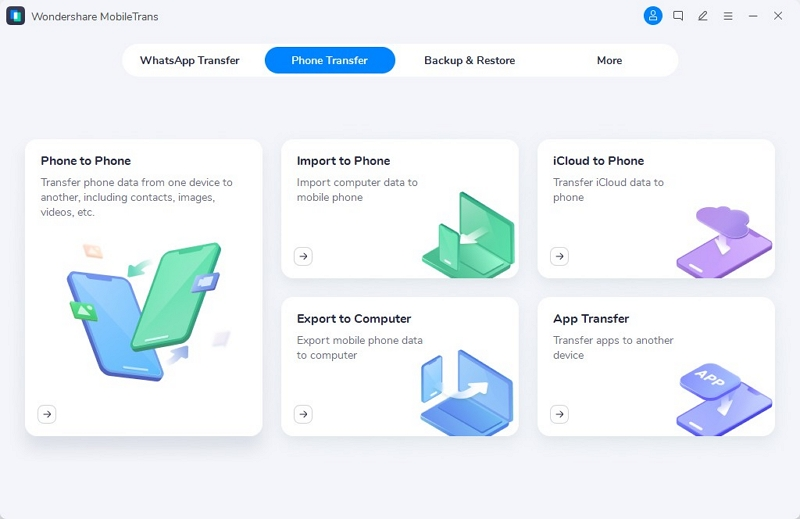
    Open the MobileTrans app and select “Phone Transfer.” In this tab, choose the option “Phone to Phone” and connect both old Redmi and new iPhone devices to your computer via USB cables.
    Step 2: Ensure Android and iPhone are Connected to System

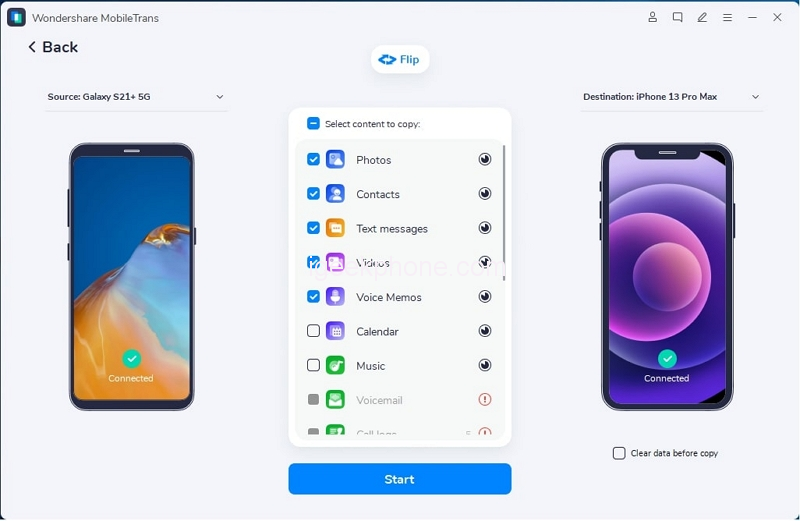
    With both devices now connected, check if they are correctly positioned at “Source” and “Destination.” If not, tap “Flip” to change their positions. Once confirmed, select the data you want to transfer. If you want to delete the existing data on your iPhone, check the “Clear data before copy” option.
    Step 3: Start and Wait for Process Completion

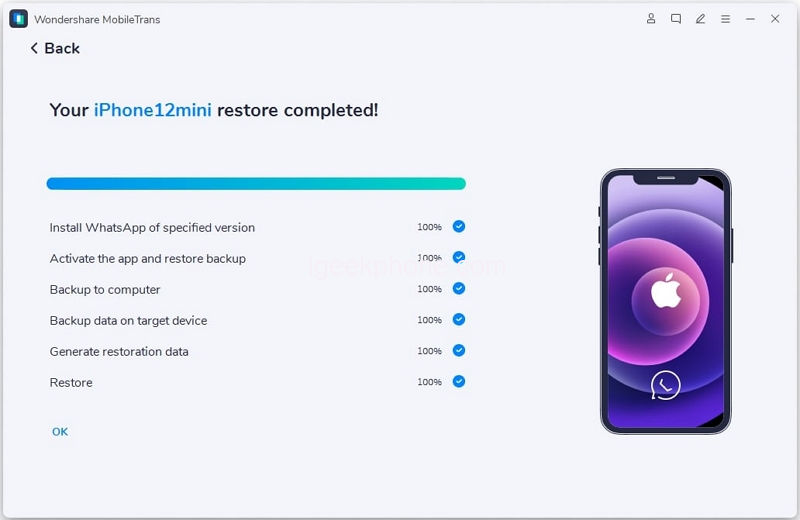
    Now you can press “Start” to begin the process. When the transfer is happening, do not move or touch the devices. Once the process is completed, you will receive a notification of its success.
    Part 2: MobileTrans – WhatsApp Transfer: WhatsApp Data Transfer from Android to iPhone

    Although you have transferred all major types of data, there is one major part left, and that is WhatsApp transfer. Your WhatsApp likely contains some of your most essential data, and so it needs a tool made specifically to move all its data. MobileTrans – WhatsApp Transfer is a tool designed to handle all the issues regarding WhatsApp transfer. No worries if the data is deleted; it can recover data back. This app covers you even if you need to restore Google Drive WhatsApp backup to your iPhone.

    If you need to merge newly transferred data with old one; consider it done if you are using MobileTrans – WhatsApp Transfer. You can follow these steps to transfer your WhatsApp data from Android to your iPhone:

    Step 1: Open the “WhatsApp Transfer” Tab on MobileTrans App

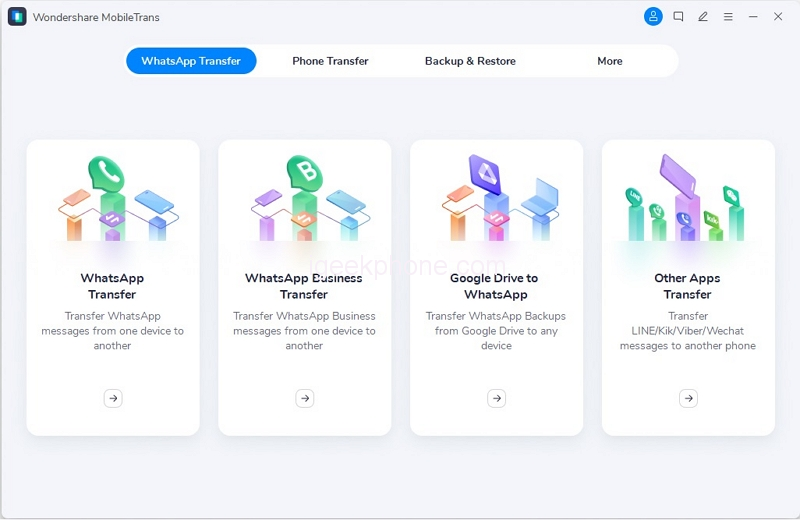
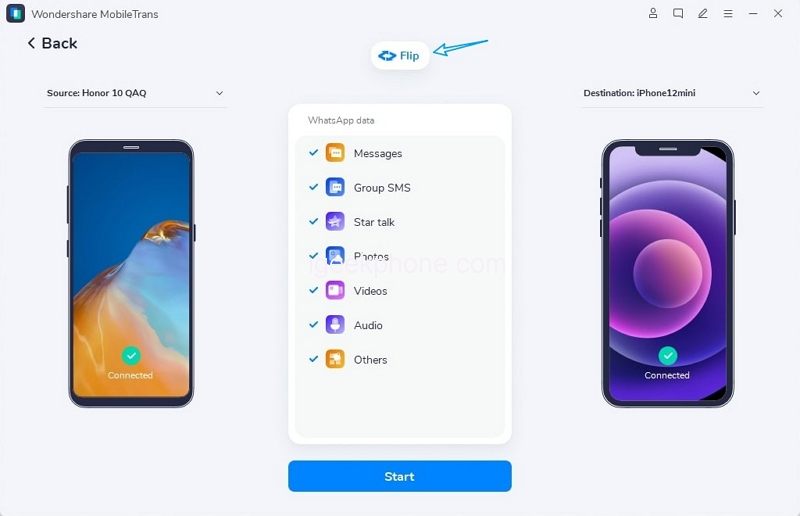
    You need to select the “WhatsApp Transfer” tab after opening the app. Here, choose the “WhatsApp Transfer” option and tap on the “Transfer WhatsApp messages” feature to get started. Connect both of your devices to your computer to establish a connection between them.
    Step 2: Connect Android and iPhone to Your System

    After you have connected the Redmi and iPhone to the system, allow the program to load and place these devices in their respective positions. If the placement order being shown is wrong, click “Flip” to correct it. Following this, select the WhatsApp data you want to transfer and hit “Start.”
    Step 3: Transferring All WhatsApp Data on iPhone

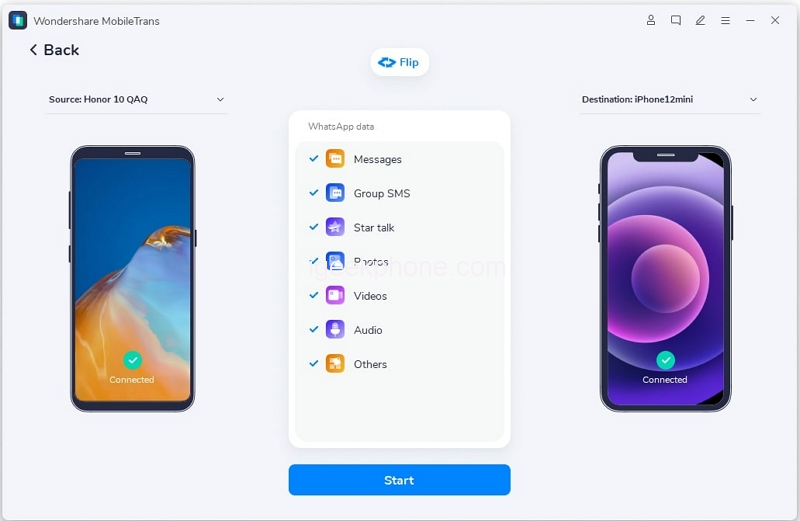
    Once you have hit the “Start” button, patiently wait for the process to end. Don’t be in a hurry, and no touching or moving of devices as it can disrupt the transfer. It should take a couple of minutes to complete the WhatsApp transfer from Android to iPhone.
    Bonus Tips: Overview of a Mobile App for Transferring Phone and WhatsApp Data

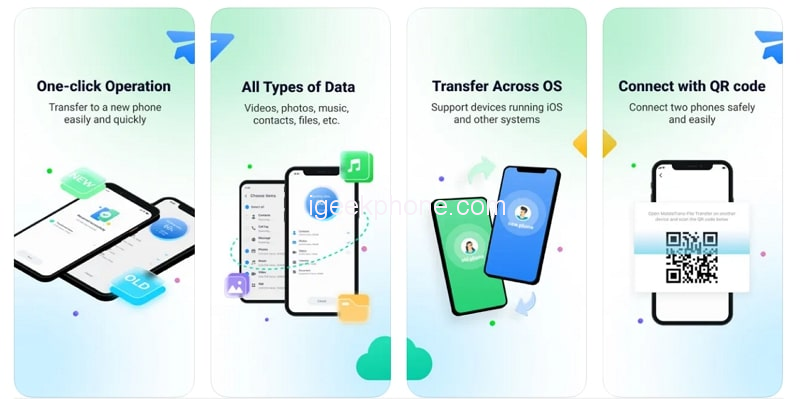
    MobileTrans is available not only on your computer but also in the form of Android and iOS apps. If you don’t want to go through the hassle of a computer, you need to install the Android app and the iOS app on iPhone. There is no need for any USB cables or Wi-Fi to complete the process. Install the MobileTrans app on both devices, and you can transfer data between them.
    1. Phone Transfer

    MobileTrans, the mobile app, allows you to transfer multiple types of data from one device to another. It allows the transferring of messages, photos, videos, audio, documents, and many more types of data. You can also transfer your apps using it, whether on the same platform or across the platform. All you need to do is install the app on both devices, select the data you want to send, pair it up with the new device, and press “Send.”

    2. WhatsApp Transfer

    The WhatsApp Transfer feature of the MobileTrans mobile app also offers you to transfer all types of WhatsApp data from one device to another. It can transfer all kinds of data, including chats, stickers, emojis, attachments, documents, contacts, locations, etc. What you need to do is pair up both the old Redmi device and the new iPhone using MobileTrans app. Then select the WhatsApp data you want to transfer and hit “Send” to complete the process.

    Final Thoughts

    While Android phones offer many benefits at very low prices, it cannot be denied that they have some glaring problems regarding security. So, it would be better to move to a secure platform where your data is saved from third parties and is not actively harvested. Wondershare MobileTrans can make the transitioning period between different devices less hectic for you by solving your data transfer problems.

    Share. Facebook Twitter Pinterest LinkedIn Tumblr Email

    Related Posts

    Best Service to Move Photos from Google Drive to Google Photos – MultCloud

    The Transformation of the Metaverse: Cryptocurrency’s Impact on the Virtual Realm

    How Does Technology Impact Student Learning: Pros and Cons?

    Comments are closed.

    voopoo drag s3
    oxva slim stick
    sp2s sen x disposable vape
    jnr 100k
    • Popular
    • 3D Printer REVIEW
    • XIAOMI
    December 9, 2025

    OXVA Xlim Go vs. OXVA Xlim Go 2: Hands-On Review

    December 9, 2025

    OXVA XLIM PRO 3 VS XLIM PRO 2 Review: Hands-on Comparison

    December 9, 2025

    OXVA XLIM 3 Ultra vs. XLIM Pro 2 DNA Review: Hands-on Comparison

    December 8, 2025

    OXVA XLIM SQ PRO 2 vs XLIM SQ PRO Hands on Comparison Review

    June 23, 2024

    ACMER P2 20W Laser Engraver Fixed Focus Engraving: Hands on Review

    May 30, 2024

    xTool F1 Ultra Review: World’s First 20W Fiber & 20W Diode Laser Engraver

    May 30, 2024

    Anycubic Kobra 3 Combo Review: The Multicolor Masterpiece?

    May 15, 2024

    SCULPFUN SF-A9 40W Laser Engraver Cutting Machine: Hands On Review

    December 18, 2025

    Xiaomi 17 Ultra will be available next week! Lu Weibing: All of Xiaomi’s main high-end flagship models will be released in the same year.

    December 17, 2025

    Xiaomi 17 Ultra Leica Special Edition phone will adopt a dual brand, and in overseas markets, it will be named Leitzphone

    December 17, 2025

    The internal test activity of Background Stacking Arrangement style of Xiaomi’s HyperOS 3 has been Exposed

    December 15, 2025

    Xiaomi 17 Ultra has not been officially announced yet. Mi fans are exclaiming that Xiaomi’s confidentiality measures are too strict

    fc 26 coins
    New Arrivals
    • Realme Narzo 90 Realme Narzo 90
    • Maskking Veso S Pod Vape Maskking Veso S Pod Vape
    • SKWEZED X iJOY XP50000 Disposable Vape SKWEZED X iJOY XP50000 Disposable Vape
    • OXVA ARTIO 2 Battery Device 900mAh OXVA ARTIO 2 Battery Device 900mAh
    • Lost Vape Centaurus Ori 35 Pod System Kit Lost Vape Centaurus Ori 35 Pod System Kit
    • Oxbar Maglink 50K Disposable Vape Oxbar Maglink 50K Disposable Vape
    • Hellvape Vsee Now Pod System Kit Hellvape Vsee Now Pod System Kit
    • Hellvape Vsee One Pod System Kit Hellvape Vsee One Pod System Kit
    • JOOZY PRO 30K DISPOSABLE KIT JOOZY PRO 30K DISPOSABLE KIT
    About
  • Igeekphone.com provides the first global tech news and reviews about smartphone, vapes, e-cigar, smart home, 3D printers, e-bike,tablets, RC drones, VR headset, and other accessories. It's the best platform to improve your brand and product.
  • Contact us: info@igeekphone.com
  • Check Our Privacy Policy Here.
  • Note: *Right now we have US editor and EU editors for review, especially for Amazon US and EU.
  • *Shop and Compare Price Here*
  • Facebook
  • Youtube
  • OUR BEST VAPE PARTNERS
  • VAPE ONLINE STORE
  • HAYATI PRO MAX PLUS
  • VAPORESSO
  • VOOPOO
  • OXVA
  • NEXA
  • MASKKING
  • LOSTVAPE ORIONBAR
  • VEIIK
  • MEMERS
  • TODOO
  • SP2S
  • JNR
  • OTHER BEST PARTNERS
  • SVBONY
  • Chuwi
  • Blackview
  • Fossibot
  • Unihertz
  • Flsun
  • Anycubic
  • Xtool
  • Oukitel
  • Mukkpet Ebike
  • Ugreen
  • Copyright © 2025 igeekphone

    Type above and press Enter to search. Press Esc to cancel.