





Facebook Twitter Instagram
    Trending
    • SG901 PRO & MAX GPS Drone Soars with Power & Intelligence Review
    • Best Methods to Select A Quality Smartwatch
    • How to Install Soundcore app on PC
    • Exploring Effective Sewer Drain Cleaning Techniques
    • How Red is Changing the Game for Creators in 2025
    • JJRC C8827 PRO-YW 1/43 Scale 4WD RC Car Review-The Ultimate Miniature Drift Machine
    • Revolutionizing Digital Access: Learning More About Fiber Internet
    • How to Have the Best Free Slot Machines with No Sign-up or Need for Verification
    Facebook YouTube
    Login Register
    IGeeKphone China Phone, Tablet PC, VR, RC Drone News, Reviews
    • HOME
      • NEWS
        • DeepSeek
        • ChatGPT
        • Minecraft
    • Amazon
    • CHRISTMAS
    • PHONE
      • Top Phones For Your First Choice
      • Phone Comparison
      • Xiaomi
      • Blackview
      • Unihertz
      • Doogee
      • Black Shark
      • Geekbuying
      • Banggood
      • TEMU
      • TikTok
      • Aliexpress
      • Walmart
      • Newegg
      • MercadoLibre
      • Lazada
    • TOP VAPE Awards for 2025
    • VAPES
      • E-CIGAR Upcoming
      • Vape News
      • Vape Market Trend
      • Vape Deals
      • Expo News
      • Vape Comparison
      • Vape Guide
        • Guide For Beginners
        • Guide for Best Users
      • Giveaway
    • BEST VAPE
      • Best Vape Stores
      • Best Starter Vape Kits
      • Best Vapes for Beginners
      • Best Disposable Vapes
      • Best Pod Systems
      • Best Pod Mod Vapes
      • Best Mods
      • Best Nicotine Pouches
      • Best Clearomizers/Tanks
      • Best E-Liquid
      • Best EGO/Pens
      • Best Vapes for Nic Salt E-Juice
      • Best Vapes to Quit Smoking
      • RDA vs. RDTA vs. RTA
    • Best Vape Brand 2025
      • VAPORESSO
      • VOOPOO
      • OXVA
      • NEXA BAR
      • ORIONBARTECH
      • MASKKING VAPE
      • VEIIK
      • MEMERS
      • SP2S
      • JNR
      • TODOO
      • MRFOG
    • REVIEW
      • E-cigar Review
      • Phones
      • Tablet PC
      • TV Box
      • RC Drone
      • Wearables
      • Camera
      • Accessories
      • VR Headset
    • MORE
      • 3D PRINTER
        • 3D Printer Review
        • Anycubic
        • FLSUN
        • Xtool
        • LONGER
        • Top 3D printer to Choose First
      • TREND
      • CLOTHES
      • AUTO CAR
      • POWER STATION
        • Oukitel
        • FOSSIBOT
      • GAMING
        • Top Gaming Products
      • E-BIKE
        • Samebike
        • Happyrun
        • ENGWE
      • TABLET
        • Chuwi
        • INNOCN
        • Teclast
        • Top Tablet for Your First Choice
        • Tablet/Laptop Comparison
      • WEARABLES
        • OneOdio
        • BlitzWolf
        • Top Smartwatch for First Choice
      • SMART HOME
      • TV BOX
        • Chuwi mini pc
        • Beelink
        • GMKTEC
        • MOREFINE
      • RC DRONE
        • DJI
        • MJX
        • JJRC
        • Hubsan
        • Top RC Drone
      • CAMERA
        • Gopro
        • Insta360
        • Andoer
      • ACCESSORIES
      • VR HEADSET
      • ROM
        • SAMSUNG
        • XIAOMI
        • ASUS
        • MEIZU
        • LENOVO
        • HUAWEI
        • ONEPLUS
        • ZTE
        • UMIDIGI
        • DOOGEE
        • HOMTOM
        • ELEPHONE
        • ULEFONE
        • BLACKVIEW
        • VERNEE
        • LEAGOO
        • CHUWI
        • TECLAST
        • PIPO
        • TV BOX ROM
    • DEAL
    • Shop
    IGeeKphone China Phone, Tablet PC, VR, RC Drone News, Reviews
    You are at:Home»Guide»3 Effective Ways to Recover Deleted Files on Android Without Root
    Guide

    3 Effective Ways to Recover Deleted Files on Android Without Root

    Brady CottonBy Brady CottonOctober 14, 2022
    Facebook Twitter Pinterest LinkedIn Tumblr Email

    During our daily lives, it’s easy to erase essential data and information stored on our Android smartphones mistakenly. Destroying critical information accidentally in our daily life is a common occurrence. Let’s solve this issue quickly by reading this blog.

    Is it mandatory to root Android device to recover the deleted data?

    The answer is no. It is desperate for us to erase some of our most charming photographs, movies, images, files, and other essential types of data by mistake. Indeed, Android data with root is one of the ways to restore data but not necessary. Rooting is a common function that grants Android users access to their device as an administrator or a superuser, meaning that you can make any modifications to your operating system, including those that phone makers and carriers often prohibit. 

    Although rooting can completely master an Android device in a matter of minutes by breaching the security settings implemented by the manufacturer, it also comes with many negatives.  The following are the related risks:

    • Rooting your phone incorrectly might leave it inoperable

    Conduct an in-depth study about the process of rooting your phone. The method of rooting an Android device might vary depending on the device’s model, and some rooting techniques are often patched. If you are unsure how to root your device or utilize Android root software, leaving this task to someone with some technical experience is best.

    • You will render your warranty

    If you get root access, your warranty will be null and invalid immediately. If anything goes wrong with your computer’s software or hardware, your phone service provider won’t be able to repair it for you.

    • This boosts viruses and hackers

    Some applications may have malware that may steal essential data, such as your device’s login credentials, passwords, or even financial information. Some of these vulnerabilities may potentially offer hackers full access to your phone.

    • Some rooting apps are terrible

    Not all software and firmware have been vetted, you risk providing hackers with complete access to your phone and any data saved on it.

    • It is risky to lose secure apps

    Before allowing you to use them, specific applications with a high level of security examine your smartphone to see whether it has been tampered with by hackers. 

    Rooting a device is not against the law, but manufacturers are still working to stop it. Rooting is something you should usually avoid doing if you don’t want to risk losing access to the applications you currently have installed. Hence, let’s learn about how to operate Android data recovery without root below.

    Video Tutorial:

    Method 1:How can I recover my Android phone data without root via Ultdata for Android?

    What is Tenorshare Ultdata for Android?

    When using our Android smartphones, we risk accidentally erasing some of the most lovely and vital photos, videos, and files we have saved on those devices. In addition, it is not difficult to accidentally delete critical data and other forms of information, while we go about our day-to-day lives. However, Tensorshare Ultdata for Android is useful to fix this issue.

    Deleted photos from Android phone

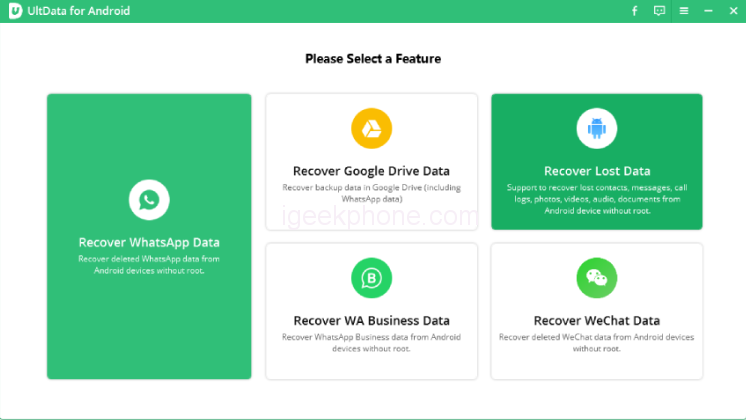
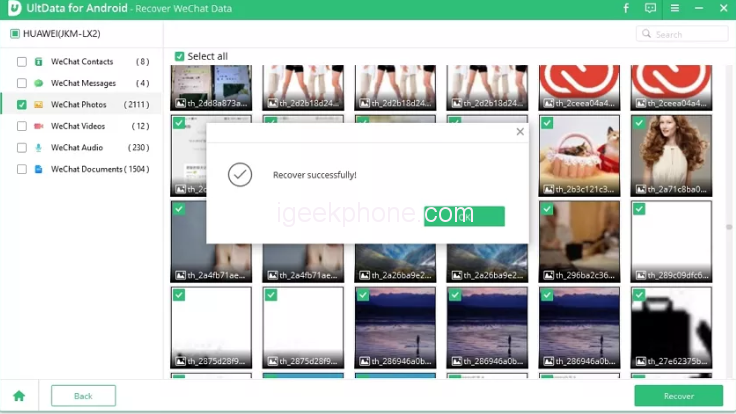
    Step 1: After downloading UltData for Android, connect your phone and pick “Recover Lost Data.”
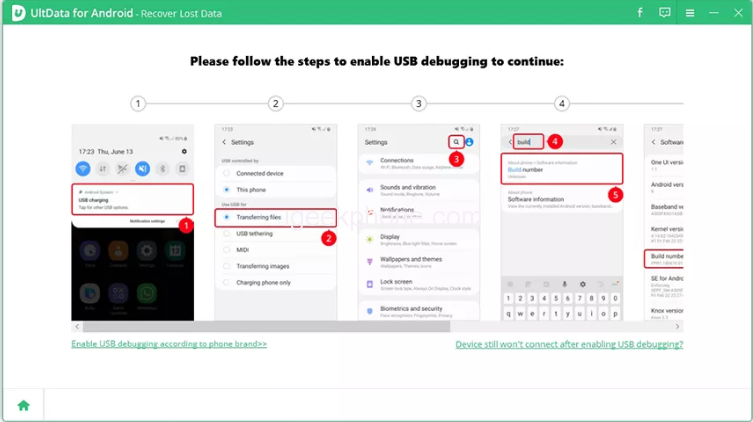
    Step 2: This app asks you to debug your Android handset when connected. Tap “OK” to allow USB debugging.
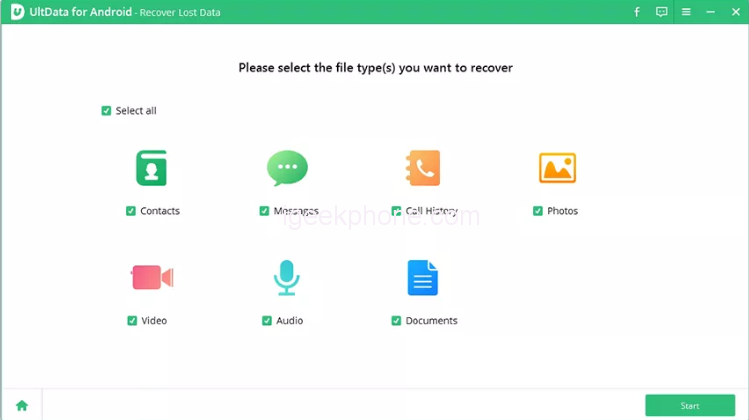
    Step 3:Choose recoverable file types. Click “Start” to scan deleted photographs. Depending on your phone’s storage, it may take some time.
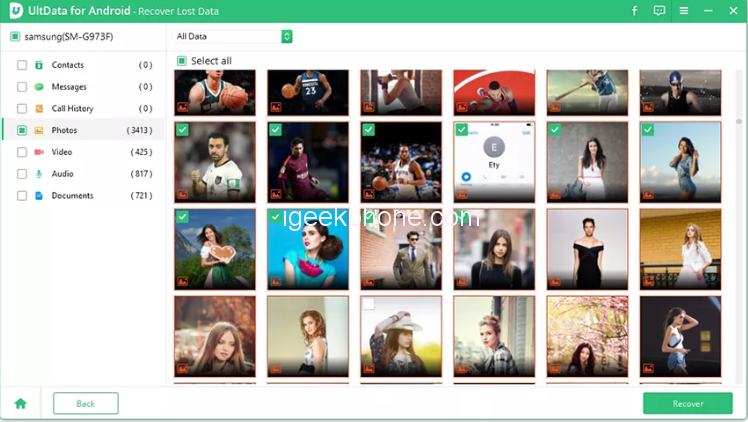
    Step 4:Choose the picture or data you wish to restore.
    Step 5: Waiting minutes. And it is exciting to see the inform “Recover successfully”.
    The Advantages of choosing Ultdata for Android

    • Strong compatibility with image and WhatsApp data recovery without root.
    • The Android data restoration procedure doesn’t need a previous backup.
    • This software can recover deleted information from over 6,000 different Android devices.
    • Scanning over a thousand files takes a few seconds.
    • Your data will be safely recovered using the newest Android OS 12.
    • It works with Google Drive, so you can quickly get backups and restore everything in one fell swoop.

    Method 2: How to Recover Deleted Files Android Unrooted Using Android data recovery app?

    The UltData for Android software makes it possible to recover Android files without rooting your device.

    Step 1
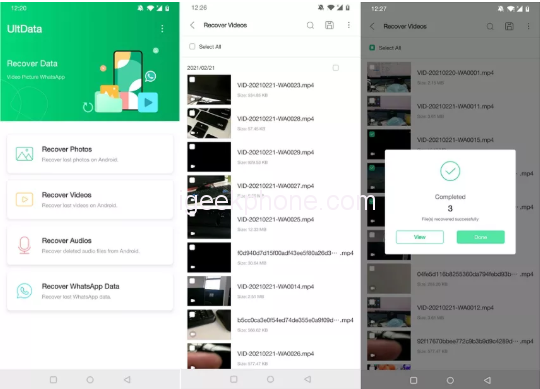
    You may pick the file types you wish to recover once you have downloaded and installed the Tenorshare UltData software on your mobile device.

    Step 2

    Give the app a chance to search for your phone. After scanning, you can see the results and choose the files you want to retrieve.

    Method 3:How to Recover Deleted Files on Android using the last backup file?

    Do you have one of the popular gadgets manufactured by Samsung, and are you also using the in-built backup option that comes with Samsung Cloud? After that, getting your data from that location won’t be challenging.

    • Pay a visit to the Settings menu on your smartphone.
    • Select “Accounts and back up” from the menu.
    • Select both Backups and restore from the menu.
    • Select Restore data.
    • Select the items you want to bring back, and then select the Restore button.

    Final Words

    When using Android smartphones, it is inevitable for us to mistakenly delete images, movies, and data from Android devices. Hopefully, these three effective ways are dedicated to recovering deleted files on Andriod without root, especially the best Android data recovery software from Tensorshare, named Ultdata for Android.

    Share. Facebook Twitter Pinterest LinkedIn Tumblr Email

    Related Posts

    How to Install Soundcore app on PC

    Exploring Effective Sewer Drain Cleaning Techniques

    How Red is Changing the Game for Creators in 2025

    Comments are closed.

    voopoo drag s3
    oxva xlim go 2
    sp2s sen x disposable vape
    jnr 100k
    • Popular
    • 3D Printer REVIEW
    • XIAOMI
    December 9, 2025

    OXVA Xlim Go vs. OXVA Xlim Go 2: Hands-On Review

    December 9, 2025

    OXVA XLIM PRO 3 VS XLIM PRO 2 Review: Hands-on Comparison

    December 9, 2025

    OXVA XLIM 3 Ultra vs. XLIM Pro 2 DNA Review: Hands-on Comparison

    December 8, 2025

    OXVA XLIM SQ PRO 2 vs XLIM SQ PRO Hands on Comparison Review

    June 23, 2024

    ACMER P2 20W Laser Engraver Fixed Focus Engraving: Hands on Review

    May 30, 2024

    xTool F1 Ultra Review: World’s First 20W Fiber & 20W Diode Laser Engraver

    May 30, 2024

    Anycubic Kobra 3 Combo Review: The Multicolor Masterpiece?

    May 15, 2024

    SCULPFUN SF-A9 40W Laser Engraver Cutting Machine: Hands On Review

    December 11, 2025

    Xiaomi 17 Ultra will officially announce next week: it will be the first to feature a brand-new Leica 1-inch main camera

    December 10, 2025

    The official version of Xiaomi Hyper OS 3 covers more models. MIX Fold 3 and others will start to be rolled out in gray scale and gradually from today

    December 9, 2025

    The Appearance Renderings of Xiaomi 17 Ultra are here: The classic large round lens returns without a back screen

    December 8, 2025

    Comeback: Xiaomi triple foldable screen was once aborted due to the overheating of the Snapdragon 8 Gen1

    fc 26 coins
    New Arrivals
    • Arc Hypertine 35K Zero Nicotine Disposable Vape Arc Hypertine 35K Zero Nicotine Disposable Vape
    • Oppo Reno 15c Oppo Reno 15c
    • lost vape le bar 40k lost vape le bar 40k
    • RAZ RX 50K DISPOSABLE RAZ RX 50K DISPOSABLE
    • Xiaomi Poco C85 Xiaomi Poco C85
    • Innokin Foretex Pod System Kit Innokin Foretex Pod System Kit
    • Geekvape Aegis Mini 5 Vape Mod Kit Geekvape Aegis Mini 5 Vape Mod Kit
    • Freemax Albar MX 20K Disposable Vape Freemax Albar MX 20K Disposable Vape
    • Innokin EZ Leva Pod System Kit with PCC 2400mAh Innokin EZ Leva Pod System Kit with PCC 2400mAh
    About
  • Igeekphone.com provides the first global tech news and reviews about smartphone, vapes, e-cigar, smart home, 3D printers, e-bike,tablets, RC drones, VR headset, and other accessories. It's the best platform to improve your brand and product.
  • Contact us: info@igeekphone.com
  • Check Our Privacy Policy Here.
  • Note: *Right now we have US editor and EU editors for review, especially for Amazon US and EU.
  • *Shop and Compare Price Here*
  • Facebook
  • Youtube
  • OUR BEST VAPE PARTNERS
  • VAPE ONLINE STORE
  • HAYATI PRO MAX PLUS
  • VAPORESSO
  • VOOPOO
  • OXVA
  • NEXA
  • MASKKING
  • LOSTVAPE ORIONBAR
  • VEIIK
  • MEMERS
  • TODOO
  • SP2S
  • JNR
  • OTHER BEST PARTNERS
  • SVBONY
  • Chuwi
  • Blackview
  • Fossibot
  • Unihertz
  • Flsun
  • Anycubic
  • Xtool
  • Oukitel
  • Mukkpet Ebike
  • Ugreen
  • Copyright © 2025 igeekphone

    Type above and press Enter to search. Press Esc to cancel.